Important Note for Clié users:
There is an issue regarding MS Import and JPGview. If you have problems using MS Import please disable the option 'JPGview autostart' in the preferences.
This issue is solved (by removing the autostart option for Clié devices) in the current beta version.
12/31/04 BugFix: App crash on some highres devices
05/18/03 NEW! With GIF support, random slide show, sending images via bluetooth & IrDa
10/25/02 NEW! Supports the Exchange Manager -> Works with SnapperMail and allows direct beaming of JPEGs via IrDa or Bluetooth from Digital Cameras/Notebooks
11/08/02 NEW! Support for Palm OS 5 (Tungsten T)!
11/27/02 NEW! Thumbnail preview:
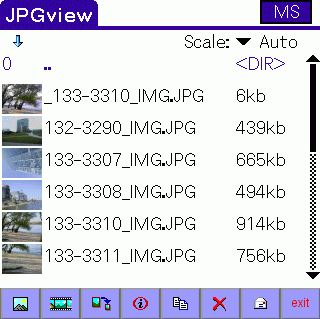
JPGview enables you to view and modify JPEG Image files stored on a Compact Flash Card, SD/MMC, Memory Stick,.. on your VFS compatible PalmOSŪ device!
You can use it either to simply view and modify your images made by a Digital Camera, or just store and view Images without using the internal Memory of your Handheld device.
JPGview is able to receive and send JPEG files via bluetooth or Infrared. So you can transfer images from/to your Notebook, Cell phone, ...
If you have your last vacation photos on your device you can view them using the new slideshow function.
A great advantage of JPG files is the high compression level.
You can store more than 260 images in an acceptable quality with a resolution of 160x160 pixels on a small 4MB CF card!
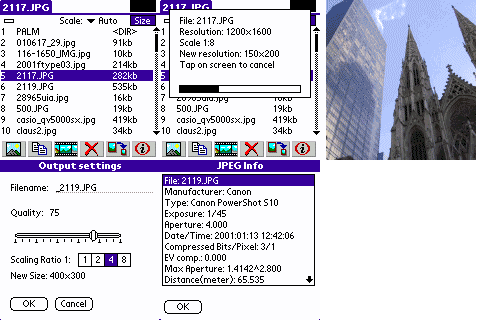
You will like the feature to copy files into another directory or change the resolution and compression rate of a JPG image.
Now you can send handy pictures from your vacation to your friends or update a web-page online with a cell phone.
See also SnapperMail for sendig attachments from a memory card:
SnapperMail
The best Email client for PalmOS!
In addition JPGview is able to read the extended header of JPGs coming from a digital camera. It shows data like aperture, exposure, EV compensation,....
Most of the actual Digicams store also a thumbnail picture as a part of the header (160x120 pixels). JPGview is able to use this thumbnail for a quick preview.
If you don't have a digital camera or a card reader/writer, check out SyncWizard at PalmGear.com to move images to the flash card in your PalmOS device:
SyncWizard at PalmGear
Some comments/reviews about JPGview:
 Palmgear
- JPGview at PalmGear - With REVIEWS!
Palmgear
- JPGview at PalmGear - With REVIEWS!
Nexave
- JPGview review at Nexave (german/deutsch)
www.pcworld.com
- JPGview review at PCworld.com
ZDnet Japan
- JPGview review at ZDNet JAPAN (japanese!)
JPGView - An app for the TRGPro or Handera 330 that allows you to view JPG files off of your CF or SD/MMC card. It makes full use of both the Handera 330's high resolution, but its digital graffiti area and allows rotation of the screen! This is my one and only image viewer for my Handera!
Source
JPGView - Permits viewing of JPG files on PalmOS devices without file conversion -- works directly off of expansion card only. Cool!
Source
Features of the current Version 3.0.1:
- Send images directly via Snappermail
- Allows receiving of images via IrDa or Bluetooth
- OS5 compatible
- Thumbnail preview
- Fix for CASIO Exilim thumbnail view (and maybe also other brands)
- Jog dial support for HandEra/SONY
- Slideshow
- Font selection
- Color support
- Handera 330 support
- Optimzed palette on 256 color devices
- View JPG files in any Path of the CF
- Automatic scaling
- Standard and progressive JPG's
- Inverted view (e.g. for Backlight)
- Copy JPG's to any path of the CF
- Delete JPG's
- Detailed File info for pictures coming from a digicam
- Write resampled JPGs back to the CF card
- Read enhanced JPG (Exif) thumbnail picture
- Move images with drag and drop if they are not completely visible
- Improved directory view
- jump to next/prev picture with the UP/DOWN keys
- Sony Clie support
- Palm 5xx support
- Image cache
- and much more....
Get the user manual to take a closer look at JPGview
 Download JPGview 3.0 User Manual
Das HandEra 330 Forum (deutsch):
Forum330
- DAS HandEra 330 Forum - Viele Infos und Links zum HandEra 330
This page was last modified 03/25/2003
 3.1
3.1




 Get the current Release Version here!